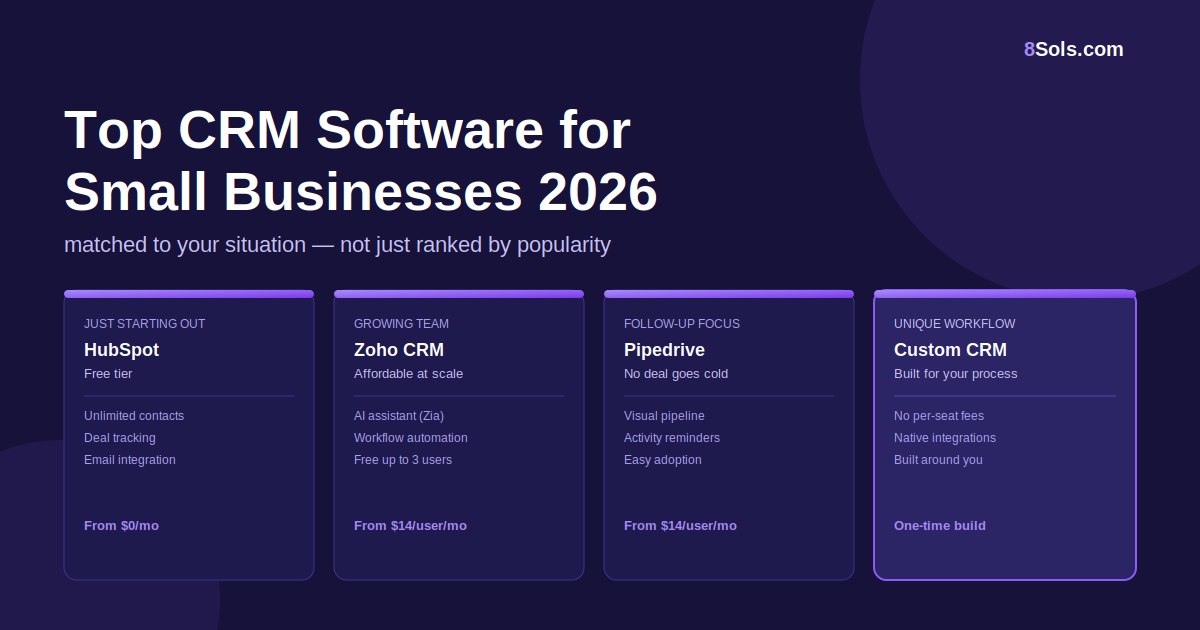
Most "best CRM" articles give you a ranked list of popular tools and call it a day. The problem? The most popular CRM isn't necessarily the right one for your business, and picking the wrong tool is exactly how you end up with software nobody uses.
This guide does something different. Instead of ranking by popularity, it matches the right CRM to the right situation. By the end, you should be able to identify which tool (or type of tool) fits where your business actually is right now.
Before comparing tools, it's worth being clear on what "right" means. For a small business, a CRM needs to clear four bars:
With that in mind, here's how the leading options in 2026 break down.
Best for: Startups and early-stage businesses with a small sales team
Starting price: Free (paid plans from ~$20/user/month)
HubSpot's free tier remains the most generous entry point in the market in 2026: unlimited contacts, deal tracking, email integration, and a meeting scheduler, all at no cost. It's the easiest place to start if you've been running your pipeline from a spreadsheet and want to formalise it without a big upfront commitment.
The honest trade-off: HubSpot's free tier is a top-of-funnel tool. Once you need automation, sequences, or deeper reporting, you'll hit the paid tiers quickly, and the pricing jumps are noticeable for small teams.
Worth it if: You want to get organised fast and you're comfortable that your sales process is fairly standard.
Best for: Growing teams of 3–15 people who need solid features without per-seat pricing shock
Starting price: ~$14/user/month (free plan available)
Zoho CRM gives you a serious feature set, pipeline management, email automation, workflow rules, and its AI assistant (Zia) for trend analysis and lead scoring. at pricing that doesn't punish you for growing your team. The free plan covers up to 3 users, making it one of the few options that lets a small team run a real CRM before committing.
The honest trade-off: Zoho's interface isn't the cleanest in the category, and the breadth of options can feel overwhelming to first-time CRM users. Plan for a longer onboarding period than HubSpot.
Worth it if: You need a mid-range feature set and want pricing that doesn't compound painfully as you add headcount.
Best for: Sales-driven teams where deals go cold because nobody followed up
Starting price: Pipedrive from ~$14/user/month; OnePageCRM from ~$9.95/user/month
Both tools are built around a single idea: no deal should ever slip because of a missed follow-up. Pipedrive organises everything around a visual pipeline and activity-based selling. OnePageCRM strips it down further every contact has one clear next action, making it almost impossible to let something go cold by accident.
The honest trade-off: Neither tool is built for complex workflows or deep reporting. They're focused. If you need marketing automation or advanced analytics, they'll feel limited.
Worth it if: Your biggest CRM failure mode is deals going cold, not lack of data.
Best for: B2B service businesses with consultative sales processes
Starting price: Free tier available; paid from ~$9/user/month
Freshsales bundles a CRM with built-in phone, email, chat, and AI lead scoring (Freddy AI) into a single platform. For B2B teams that sell by relationship: calls, follow-up emails, periodic check-ins. having phone and email natively inside the CRM (rather than integrated from outside) meaningfully reduces the admin overhead.
The honest trade-off: The AI features are impressive on paper but take time to calibrate. In the early months, lead scoring will be less useful until it has enough data to learn from.
Worth it if: Your sales team spends a lot of time on calls and email, and you want all of that tracked automatically without manual entry.
One thing most CRM comparisons understate: the difference between "starting price" and "what you'll actually pay" as your team grows.
| CRM | 5-person team/month | 15-person team/month | Notes |
|---|---|---|---|
| HubSpot (Starter) | ~$100 | ~$300 | Pricing scales per seat |
| Zoho CRM (Standard) | ~$70 | ~$210 | Affordable at scale |
| Pipedrive (Essential) | ~$70 | ~$210 | Clean, predictable |
| Freshsales (Growth) | ~$45 | ~$135 | Good value for B2B teams |
Pricing based on publicly available rates as of July 2026. Figures are approximate — always confirm directly with the vendor before purchasing, as SaaS pricing changes frequently.
Every tool on this list is built for the average sales process. Most small businesses have a sales process that's close enough to average that one of the above will serve them well.
But some businesses don't. If your sales workflow is genuinely unique., multi-stage approvals, industry-specific qualification criteria, deep integration with your operations platform or ERP.. off-the-shelf CRMs start to feel like wearing someone else's shoes.
That's the scenario where a custom CRM system makes more financial sense than it might initially appear. Instead of paying per-seat fees indefinitely while working around the tool's limitations, you build once for how your business actually operates.
It's not the right answer for every business. But if you've tried two or three off-the-shelf tools and found yourself constantly working around them, that's a meaningful signal.
The best CRM for your small business isn't the most popular one. It's the one your team will open every morning and actually trust. Start by matching your situation to the scenarios above, then trial your top pick for at least two weeks with your real pipeline data (not dummy contacts).
Still unsure which direction makes sense, or whether off-the-shelf even fits your process? Talk to our team — we work with small businesses across the UAE and US on both CRM selection and custom builds, and we'll give you a straight answer either way.
This post was researched and written with AI assistance and reviewed by the 8Sols team.